On-Premises Vs Cloud Infrastructure Comparison
Introduction
Organizations rely on IT infrastructure to support daily operations, store business data, run applications, and deliver digital services. Choosing the right infrastructure is one of the most important technology decisions because it affects cost, performance, scalability, security, and long-term business growth.
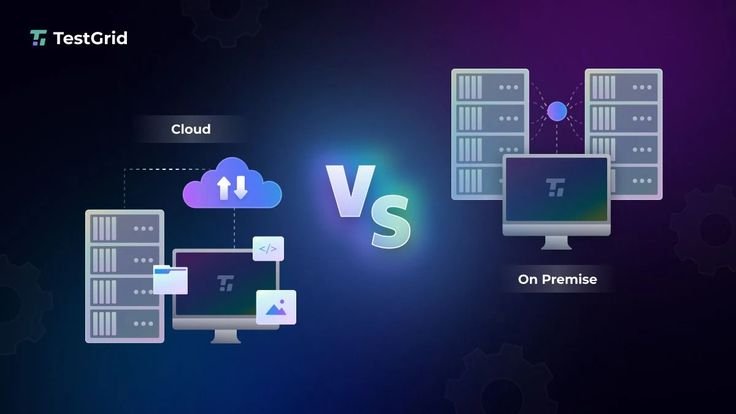
For many years, businesses primarily used on-premises infrastructure, where servers, networking equipment, and storage devices were installed and managed within company facilities. With the growth of cloud computing, organizations now have the option to host applications and data on cloud platforms managed by third-party providers.
Both on-premises and cloud infrastructure offer unique advantages and limitations. Some organizations continue using traditional data centers, while others move completely to the cloud or adopt a hybrid approach that combines both environments.
Understanding the differences between these infrastructure models helps businesses choose the solution that best matches their operational, financial, and security requirements.
This guide explains on-premises and cloud infrastructure, compares their features, advantages, disadvantages, costs, security, scalability, performance, and ideal use cases.
What Is On-Premises Infrastructure?
On-premises infrastructure refers to IT resources that are owned, installed, and managed within an organization’s physical location.
It typically includes:
- Physical servers
- Storage devices
- Networking equipment
- Firewalls
- Backup systems
- Operating systems
- Data centers
The organization is responsible for purchasing, maintaining, and securing all hardware and software.
What Is Cloud Infrastructure?
Cloud infrastructure provides computing resources over the internet through cloud service providers.
Instead of owning physical hardware, organizations rent resources such as:
- Virtual servers
- Cloud storage
- Databases
- Networking
- Security services
- Application hosting
Cloud providers manage the underlying infrastructure while customers manage their applications and data.
Key Differences Between On-Premises and Cloud Infrastructure
| Feature | On-Premises Infrastructure | Cloud Infrastructure |
|---|---|---|
| Ownership | Organization owns hardware | Cloud provider owns infrastructure |
| Deployment | Local data center | Internet-based services |
| Initial Cost | High | Low |
| Scalability | Limited by hardware | Easily scalable |
| Maintenance | Managed internally | Managed by provider |
| Accessibility | Mostly local access | Accessible from anywhere |
| Hardware Upgrades | Organization responsible | Provider responsible |
| Resource Allocation | Fixed capacity | Flexible capacity |
Cost Comparison
On-Premises Infrastructure
Requires significant upfront investment.
Costs include:
- Servers
- Storage
- Networking equipment
- Data center space
- Cooling systems
- Electricity
- Maintenance
- IT staff
Operating costs continue throughout the hardware lifecycle.
Cloud Infrastructure
Uses a pay-as-you-go pricing model.
Organizations pay for:
- Storage used
- Computing resources
- Network traffic
- Cloud services
There is little or no upfront hardware investment.
Scalability Comparison
On-Premises
Scaling requires purchasing additional hardware.
Expansion may involve:
- New servers
- Storage upgrades
- Network upgrades
- Data center expansion
Scaling often requires significant planning.
Cloud
Cloud resources can be increased or decreased quickly.
Organizations can:
- Add virtual servers
- Expand storage
- Increase computing power
- Scale automatically during high demand
Cloud offers greater flexibility.
Performance Comparison
On-Premises
Performance depends on:
- Local hardware
- Network design
- Server capacity
Applications running locally may experience lower network latency.
Cloud
Cloud providers offer high-performance infrastructure.
Performance depends on:
- Internet connection
- Cloud region
- Service configuration
Many providers operate global data centers.
Security Comparison
On-Premises Security
Organizations control:
- Physical security
- Firewalls
- Access management
- Security policies
- Data protection
Security depends entirely on internal management.
Cloud Security
Cloud providers secure:
- Physical infrastructure
- Hardware
- Core networking
Customers remain responsible for:
- User accounts
- Data protection
- Access permissions
- Application security
Cloud security follows a shared responsibility model.
Maintenance Comparison
On-Premises
Internal IT teams handle:
- Hardware maintenance
- Software updates
- Security patches
- Equipment replacement
- Infrastructure monitoring
Maintenance requires ongoing resources.
Cloud
Cloud providers manage:
- Hardware
- Infrastructure upgrades
- Equipment replacement
- Physical maintenance
Customers focus mainly on applications and configurations.
Backup and Disaster Recovery
On-Premises
Organizations create and maintain:
- Backup servers
- Recovery plans
- Off-site storage
- Disaster recovery infrastructure
Recovery planning requires additional investment.
Cloud
Many cloud providers offer built-in:
- Backup services
- Disaster recovery options
- Geographic redundancy
- High availability
Cloud simplifies recovery planning.
Accessibility
On-Premises
Access is generally available through:
- Company networks
- VPN connections
- Internal systems
Remote access may require additional configuration.
Cloud
Cloud services are accessible from anywhere with an internet connection.
This supports:
- Remote work
- Global collaboration
- Mobile access
Reliability
On-Premises
Reliability depends on:
- Local hardware
- Power systems
- Network availability
- Backup infrastructure
Hardware failures may cause downtime.
Cloud
Cloud providers often offer:
- Redundant infrastructure
- Automatic failover
- Multiple data centers
- High availability
This improves service reliability.
Compliance
On-Premises
Organizations control compliance implementation.
They manage:
- Security controls
- Data storage
- Audit logs
- Regulatory requirements
Cloud
Cloud providers support many compliance standards.
Examples include:
- ISO 27001
- SOC 2
- PCI DSS
- HIPAA
- GDPR
Customers remain responsible for using cloud services correctly.
Advantages of On-Premises Infrastructure
Benefits include:
- Full hardware control
- Custom infrastructure
- Local data storage
- Lower internet dependence
- Greater configuration flexibility
- Suitable for highly regulated environments
Disadvantages of On-Premises Infrastructure
Limitations include:
- High initial investment
- Hardware maintenance
- Limited scalability
- Equipment replacement costs
- Longer deployment time
- Higher operational expenses
Advantages of Cloud Infrastructure
Benefits include:
- Lower upfront costs
- Easy scalability
- Global accessibility
- Faster deployment
- Automatic updates
- Flexible resource allocation
- Built-in disaster recovery
- Reduced hardware management
Disadvantages of Cloud Infrastructure
Limitations include:
- Internet dependency
- Ongoing subscription costs
- Shared responsibility for security
- Limited hardware customization
- Potential vendor lock-in
When to Choose On-Premises Infrastructure
On-premises infrastructure may be suitable when:
- Strict data control is required.
- Existing hardware investments are significant.
- Applications require specialized hardware.
- Internet connectivity is limited.
- Industry regulations require local data storage.
When to Choose Cloud Infrastructure
Cloud infrastructure is often appropriate when organizations need:
- Rapid scalability
- Lower startup costs
- Remote access
- Faster deployment
- Flexible resource usage
- Global operations
Hybrid Infrastructure
Many organizations combine both approaches.
Hybrid infrastructure allows businesses to:
- Store sensitive data locally.
- Use cloud resources for scalability.
- Improve disaster recovery.
- Support cloud migration.
- Balance performance and cost.
Hybrid environments provide flexibility for many organizations.
Best Practices for Choosing Infrastructure
Before making a decision, organizations should evaluate:
- Budget
- Security requirements
- Compliance needs
- Scalability goals
- Existing infrastructure
- Technical expertise
- Disaster recovery requirements
- Long-term business strategy
Careful planning leads to better infrastructure decisions.
Future of IT Infrastructure
Modern infrastructure continues evolving through:
- Hybrid cloud adoption
- Edge computing
- Artificial Intelligence operations (AIOps)
- Infrastructure automation
- Software-defined networking
- Zero Trust security
- Container platforms
Organizations increasingly combine cloud and on-premises resources.
Conclusion
Both on-premises and cloud infrastructure offer valuable benefits, but the right choice depends on an organization’s goals, budget, security requirements, and operational needs. On-premises infrastructure provides greater control and customization, while cloud infrastructure offers scalability, flexibility, and reduced hardware management. Many businesses now adopt hybrid infrastructure to combine the strengths of both approaches. By carefully evaluating business requirements and future growth plans, organizations can build an infrastructure strategy that supports reliable operations, strong security, and long-term success.
Frequently Asked Questions (FAQ)
1. What is on-premises infrastructure?
On-premises infrastructure is IT hardware and software installed, owned, and managed within an organization’s physical location.
2. What is cloud infrastructure?
Cloud infrastructure provides computing resources such as servers, storage, networking, and databases over the internet through cloud service providers.
3. Which is more cost-effective: on-premises or cloud?
Cloud infrastructure generally has lower upfront costs, while on-premises infrastructure requires significant initial investment.
4. Which infrastructure is easier to scale?
Cloud infrastructure is easier to scale because resources can be increased or decreased on demand.
5. Is cloud infrastructure secure?
Yes. Cloud providers offer strong security, but customers must also protect their data, user accounts, and application configurations.
6. What is the shared responsibility model?
It is a security model where the cloud provider secures the infrastructure, while customers are responsible for securing their applications and data.
7. What is hybrid infrastructure?
Hybrid infrastructure combines on-premises systems with cloud services to balance performance, security, and scalability.
8. Which infrastructure is better for remote work?
Cloud infrastructure is generally better because it provides secure access from anywhere with an internet connection.
9. Can small businesses use cloud infrastructure?
Yes. Cloud infrastructure is well suited for small businesses because it reduces hardware costs and offers flexible resource usage.
10. How should organizations choose between on-premises and cloud infrastructure?
They should evaluate budget, security, compliance, scalability, technical expertise, existing infrastructure, disaster recovery needs, and long-term business goals.